Free for educators

See how your students wrote —
not just what they submitted.

DataScrut reads Google Docs revision history and shows you who typed what, when, and how much was copy-pasted. Spot academic integrity issues in minutes.

Document content never leaves your browser No student data on our servers Delete your account anytime
Signing you in…

Sign in to the dashboard

Upload your JSON reports and see class-wide analytics, timelines, and flags.

or
What you get after signing in:
  • Class-wide dashboard — upload multiple reports at once
  • Writing session timeline across all students
  • Flag summary, paste detection, fairness scores
  • Export CSV for your gradebook
🔒 No document content stored 🗑 Delete account anytime

By signing in you agree to our Terms of Service and Privacy Policy.

The problem every educator faces

Submitted ≠ written

Traditional grading only sees the final document. It cannot tell you whether a student wrote steadily over two weeks or pasted everything the night before.

🤖

Is this AI-generated or copy-pasted?

Text blocks that appear instantly in a single paste event are a clear signal. DataScrut flags every paste with its size, timing, and the author who pasted it.

👥

Who actually did the work in this group?

Group assignments hide free-riders. DataScrut shows each member's organic contribution — words typed, not pasted — so fairness is visible at a glance.

🕐

Did they write this before the assignment opened?

Time-window compliance shows exactly which edits happened outside the allowed window — essential for timed tests and controlled writing tasks.

How it works

Three steps from Google Doc to insight

No complicated setup. No student accounts. Works on any Google Doc you have viewer access to.

1

Install the Chrome extension

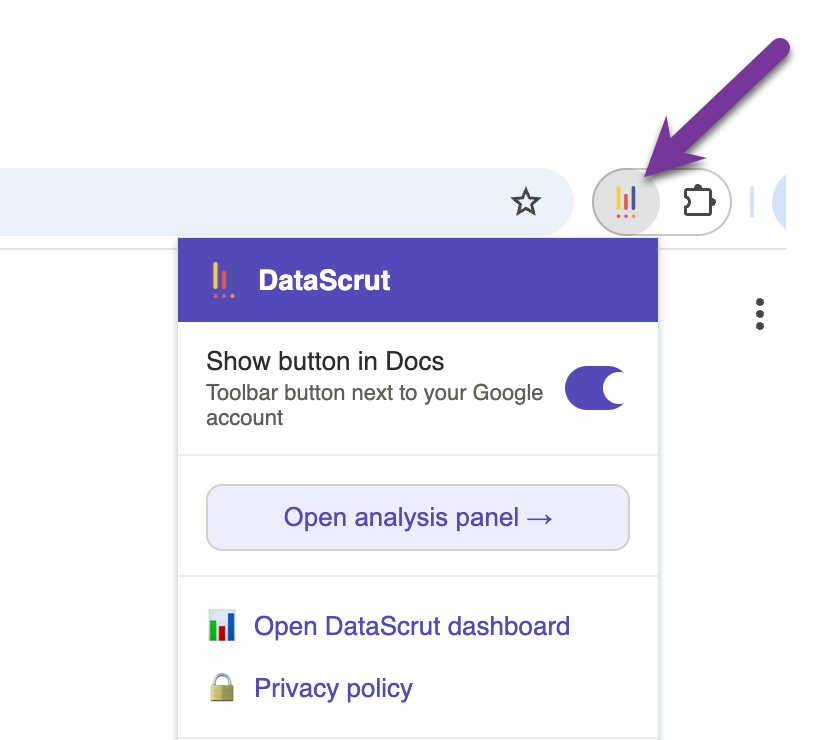
Add DataScrut to Chrome in one click. A button appears in the Google Docs toolbar next to your account icon — no configuration needed.

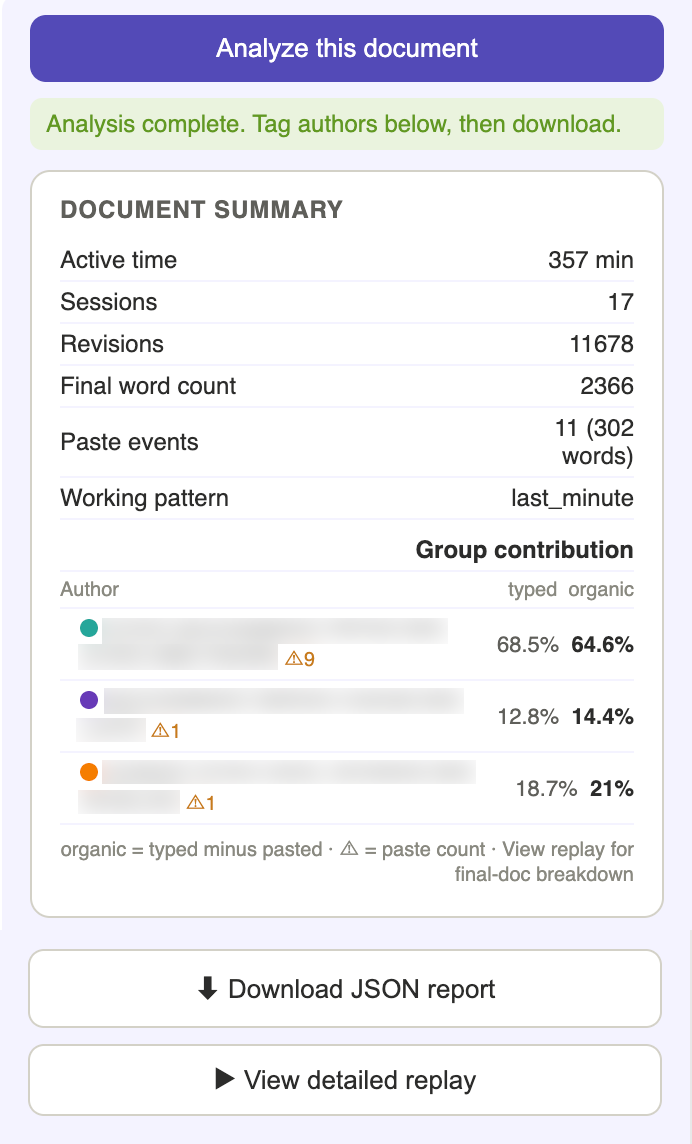
DataScrut side panel showing analysis results
2

Analyze & tag authors

Click Analyze on any Google Doc. The side panel shows active time, sessions, paste events, and group contribution. Tag authors, then download the JSON report.

Document playback controls
3

Upload to the dashboard

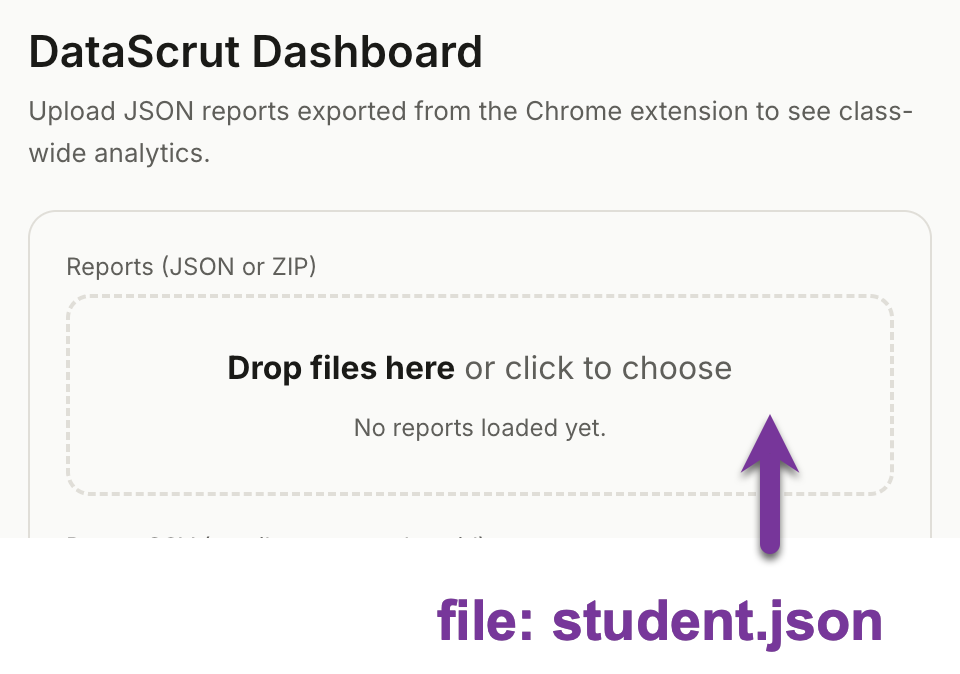
Sign in above and drop your JSON reports into the dashboard. See class-wide analytics, compare groups, review the timeline, and export to CSV.

DataScrut dashboard overview

Features

Everything you need to assess writing fairly

Writing Timeline

See exactly when every student wrote

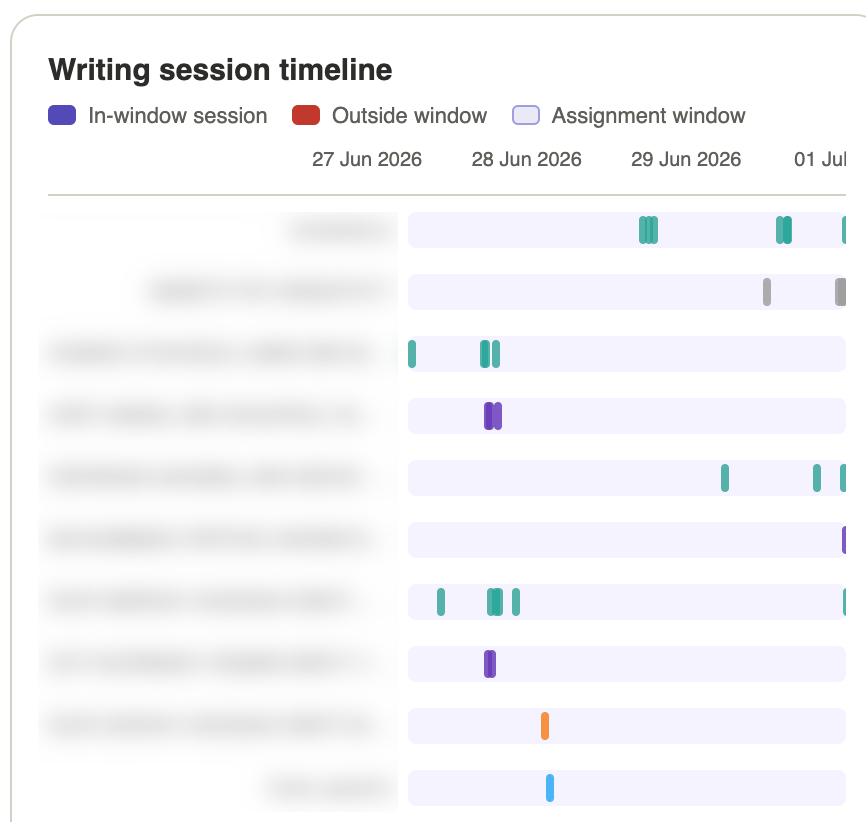
The session timeline plots every writing session as a coloured bar across the assignment period. Spot last-minute submissions, suspicious overlap, and students who never engaged.

  • Per-student coloured bars across the full assignment window
  • Out-of-window sessions highlighted in red automatically
  • Hover any bar to see session duration and words written
Writing session timeline
Activity Charts

Visualise writing patterns across the class

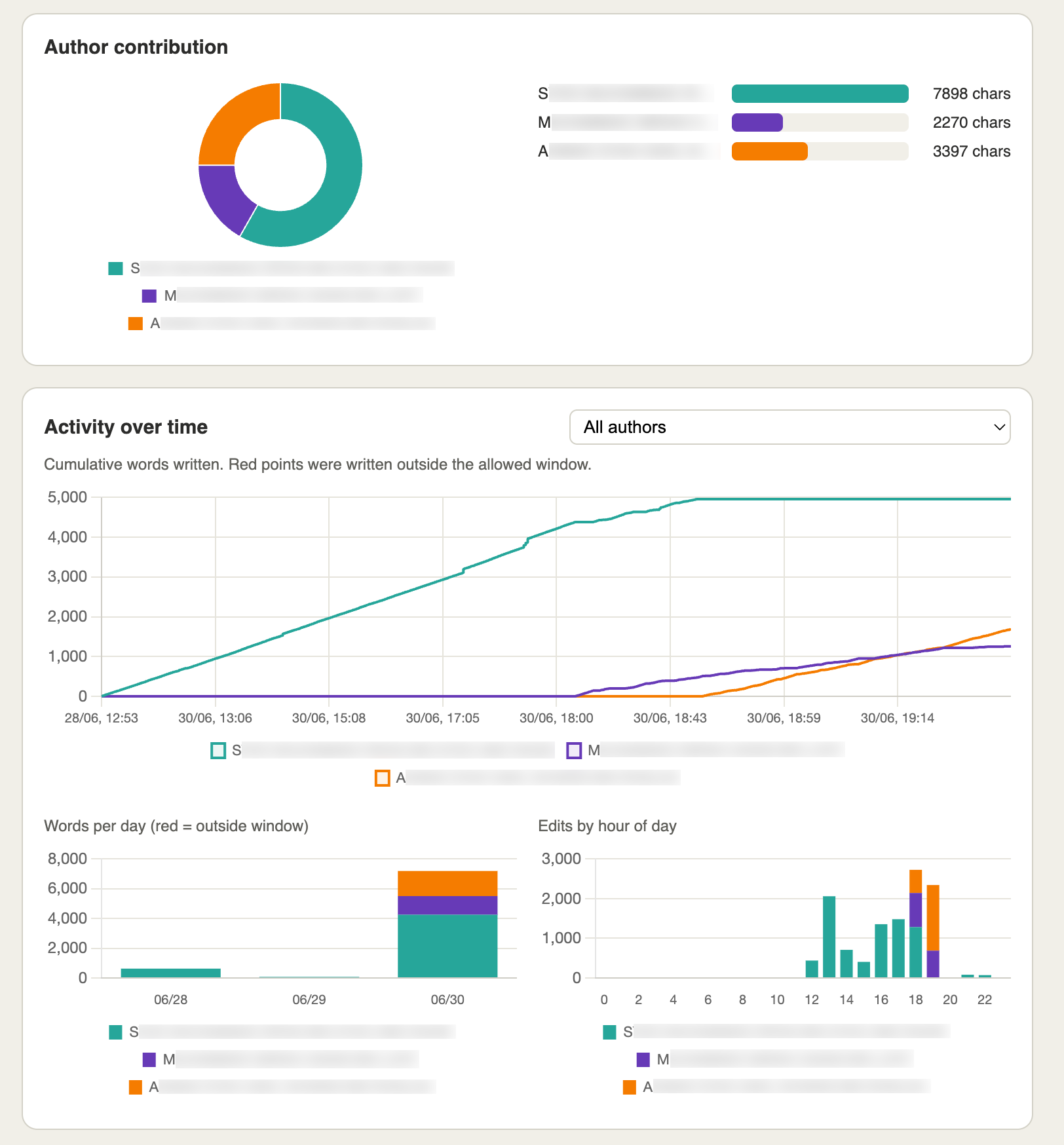
Cumulative word charts, daily activity bars, and hour-of-day breakdowns — all colour-coded by author. Immediately see who built work steadily versus who submitted in a single burst.

  • Multi-author cumulative lines show each student's pace
  • Stacked daily bars reveal which days had real writing done
  • Hour-of-day chart flags nocturnal last-minute submissions
Activity over time charts
Paste Detection

Flag copy-paste and AI-generated content

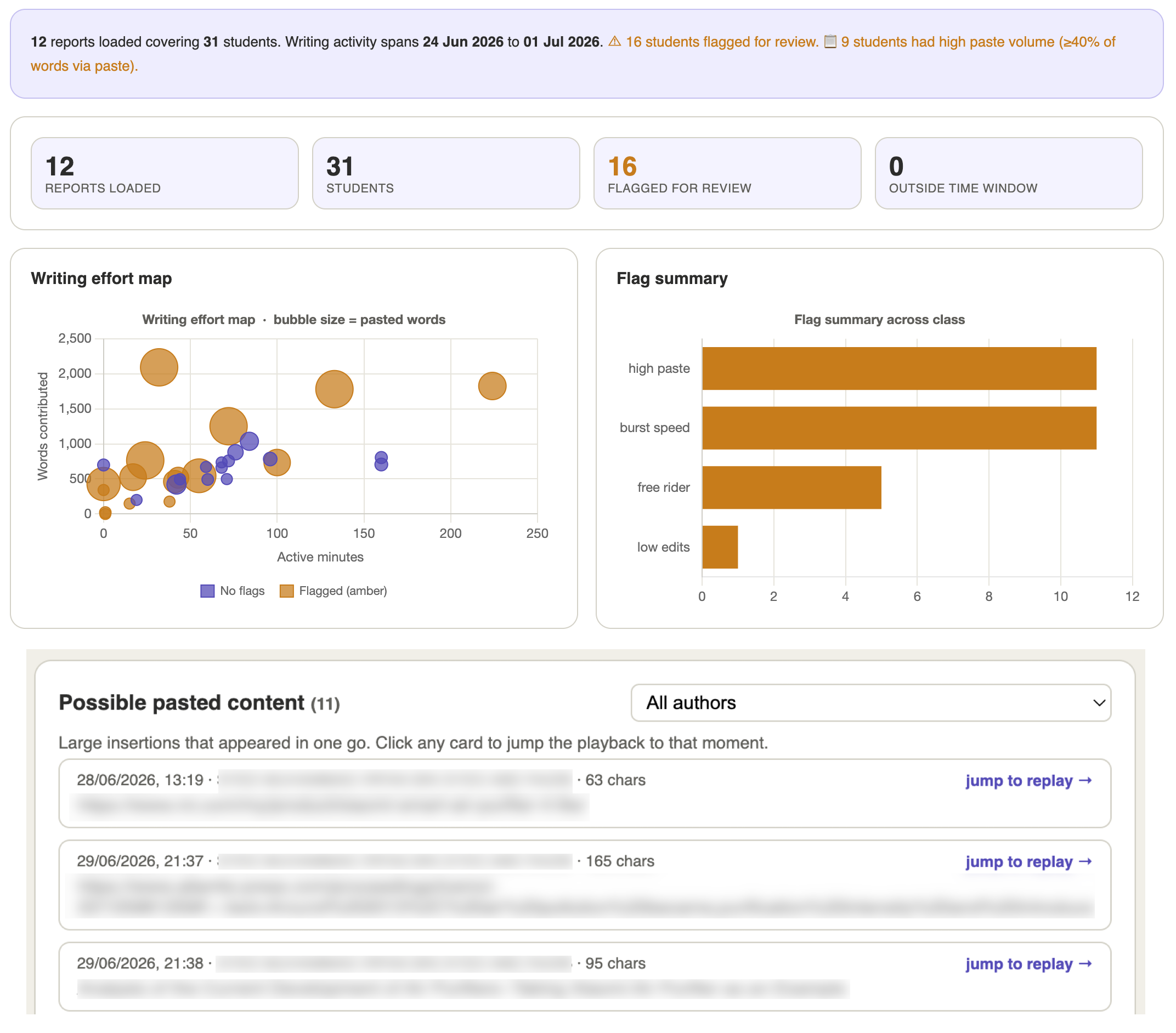
Every large paste event is logged with its timestamp, size, and author. Jump directly to that moment in the document playback to see exactly what was pasted.

  • All paste events listed with size, timing, and author
  • Jump-to-replay links go directly to the moment of paste
  • Organic contribution % excludes pasted words for fair grading
Paste detection panel
Group Fairness

Identify free-riders in group assignments

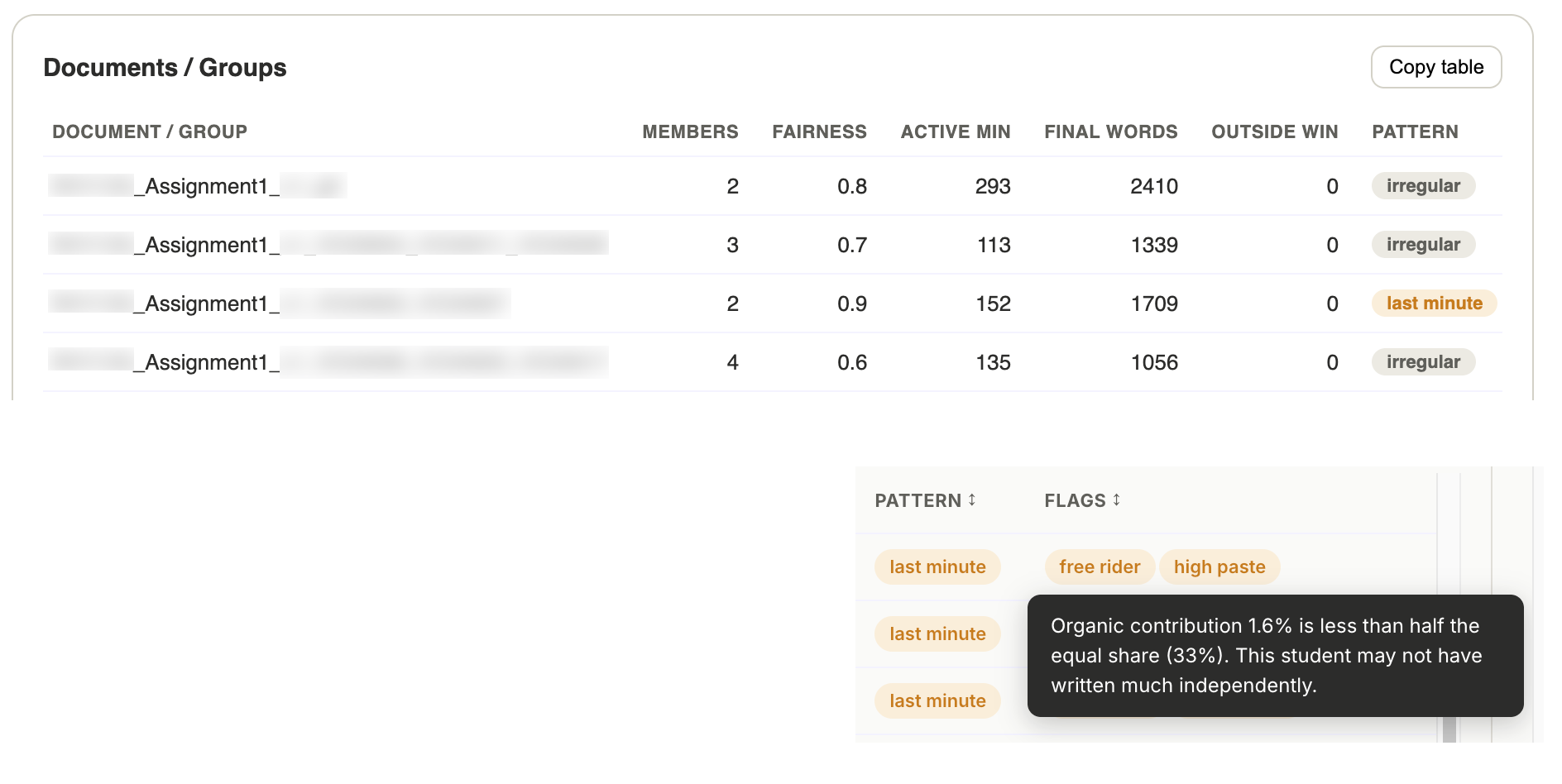
Each member's organic contribution is calculated and a fairness index is computed per group. Contribution imbalances are flagged automatically.

  • Fairness index (0–1) per group, flagged below 0.6
  • Typed % vs Organic % shown side-by-side per student
  • Free-rider flag when a member's share drops below half the equal share
Group fairness table

Pricing

Free to start. Pay only for what you use.

No monthly subscription. Buy credits when you need AI-powered analysis — perfect for assignment deadlines.

Free

$0 / forever

All the core tools for analysing student writing effort. No credit card, no expiry.

  • Chrome extension — unlimited documents
  • Writing session timeline
  • Paste detection & flagging
  • Group fairness & contribution %
  • Time-window compliance
  • Batch mode — JSON + PDF download
  • Analytics dashboard
  • Export CSV
  • Full revision-level JSON Paid
  • AI integrity analysis Paid
  • PDF integrity report Paid

FAQ

Common questions

Yes — any Google Doc where you have at least Viewer access, including documents shared by students, co-authored documents, and documents in shared drives.
DataScrut reads revision history that Google already records and that document owners can access at any time via the Version history menu. We recommend informing students in your course policies that revision history may be reviewed.
No. The Chrome extension processes everything in your browser — document content, revision history, and student names never leave your device. When you use the dashboard, JSON reports are processed in your browser session only and never sent to our servers. We store only anonymous usage counters.
DataScrut flags signals consistent with AI or copy-pasted content — large single-paste insertions, very low edit ratios, content that appeared fully-formed. These are indicators for further investigation, not definitive proof. Always follow your institution's procedures.
Yes. For individual assignments, DataScrut shows a self-typed percentage — how much the student actually typed versus pasted. The batch mode lets you process an entire class of individual assignments in one automated run.
No limits on the free plan. Analyse as many documents as you need. Batch mode queues up to 50 documents. The only thing that uses a credit — on the upcoming paid plan — is AI-powered analysis.

Start analysing student writing today

Free forever for the core features. No credit card. No student accounts needed.

Install Chrome Extension

Dashboard

Upload JSON reports exported from the Chrome extension to see class-wide analytics.
Drop files here or click to choose
No reports loaded yet.
Drop roster CSV or click
Optional — links emails to names & student IDs.
Global time-window override (optional — re-evaluates out-of-window across all reports)
Load at least one report to see analytics.